
Journey Builder
Designed with:
Figma

Role
UX/UI Designer
Team
Product Manager, Lead Developer, myself
Timeline
~2 months
spread out across 6 months
What I owned:
User flows, action vocabulary, the modal-based configuration UI, the canvas alternate path, journey lifecycle states, and the design dialogue with PM and engineering.
Jump to Section
Choose Section to Jump
The Problem & Opportunity
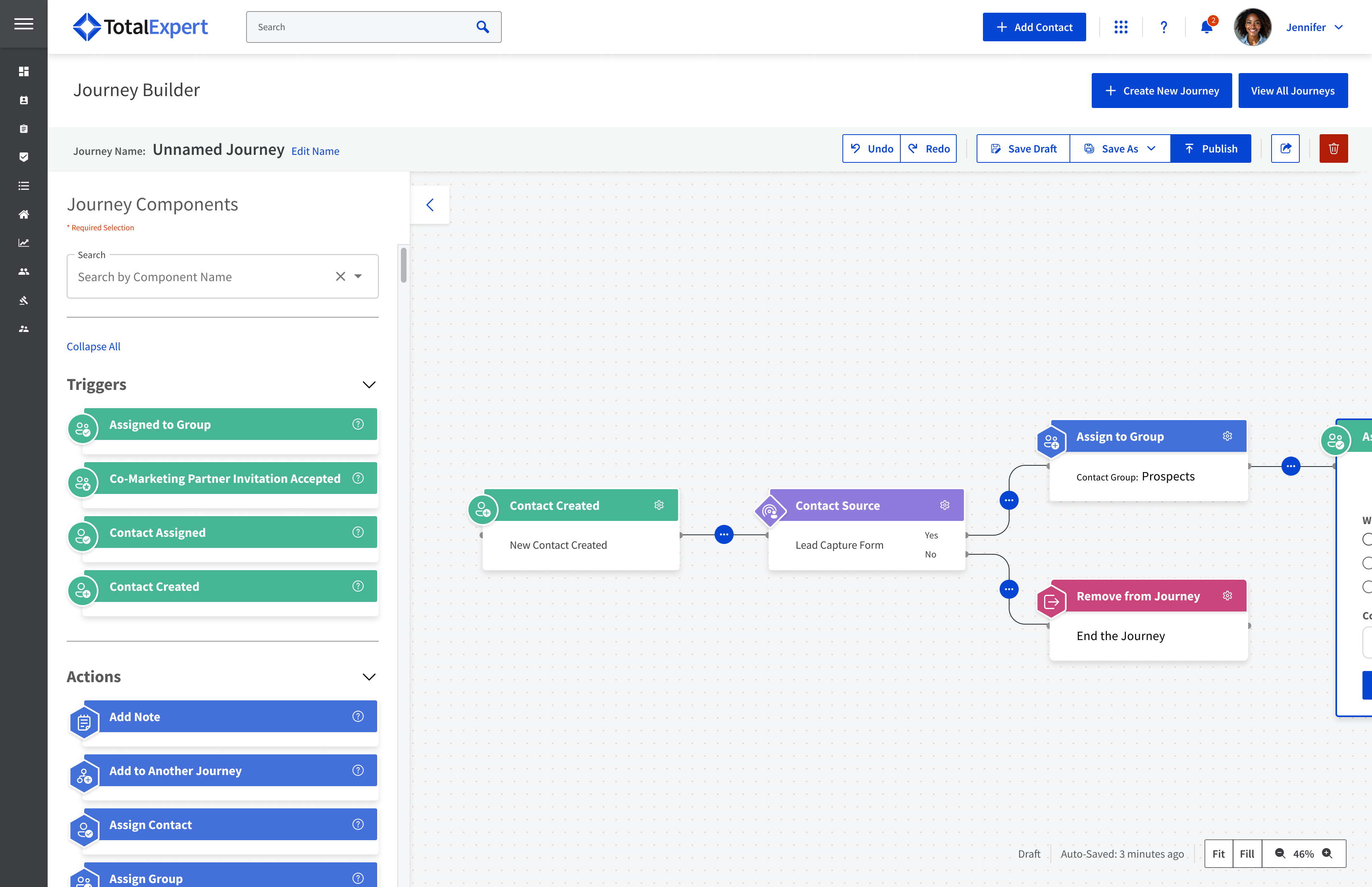
A lead comes in through a Lead Capture App. A welcome email goes out. But what happens next? The loan officer logs into Total Expert to manually add tasks and steps to the customer's journey, creating each touchpoint along the way.
The Journey Builder was Total Expert's way for relationship managers to build multi-path automated workflows that sent the right message at the right time, so leads wouldn't fall through the cracks and instead would become customers for life.
Target Users

Marketing Administrators
Loan Officers
Loan Officer Assistants
Real Estate Agents
Bank Managers and Wealth Managers were added later.


Competitive Analysis

Internal conversations
Building Understanding
How I built understanding before designing
UX was brand new at Total Expert. I was the first UX designer hired, and there was no research function. So I built understanding from the inputs I could reach.
Internal conversations
PM, lead developer, customer support, and sales, on what users were asking for and where they got stuck
Support ticket patterns
what automation requests were already coming in
Competitor patterns
how established marketing automation tools handled journey building
Round-table series
a quarterly customer interview program I advocated for and helped establish
Business Context
Why this mattered to the business
Total Expert's promise was 'customers for life.' The Journey Builder was a direct lever on that promise. The more reliably it nurtured leads and re-engaged past customers without manual work, the more that retention gap held.
~$
200B
(10% of the $2T U.S. industry)
60
%
vs
18
%
8
out of
15
Defining Scope
What I solved
Relationship managers wanted to do more than drop a contact into a list and fire a generic email. They wanted to ask "this person is in this group, but did they also do X?" and branch accordingly. Sending the right message, through the right channel, at the right time.
Compliance Constraints
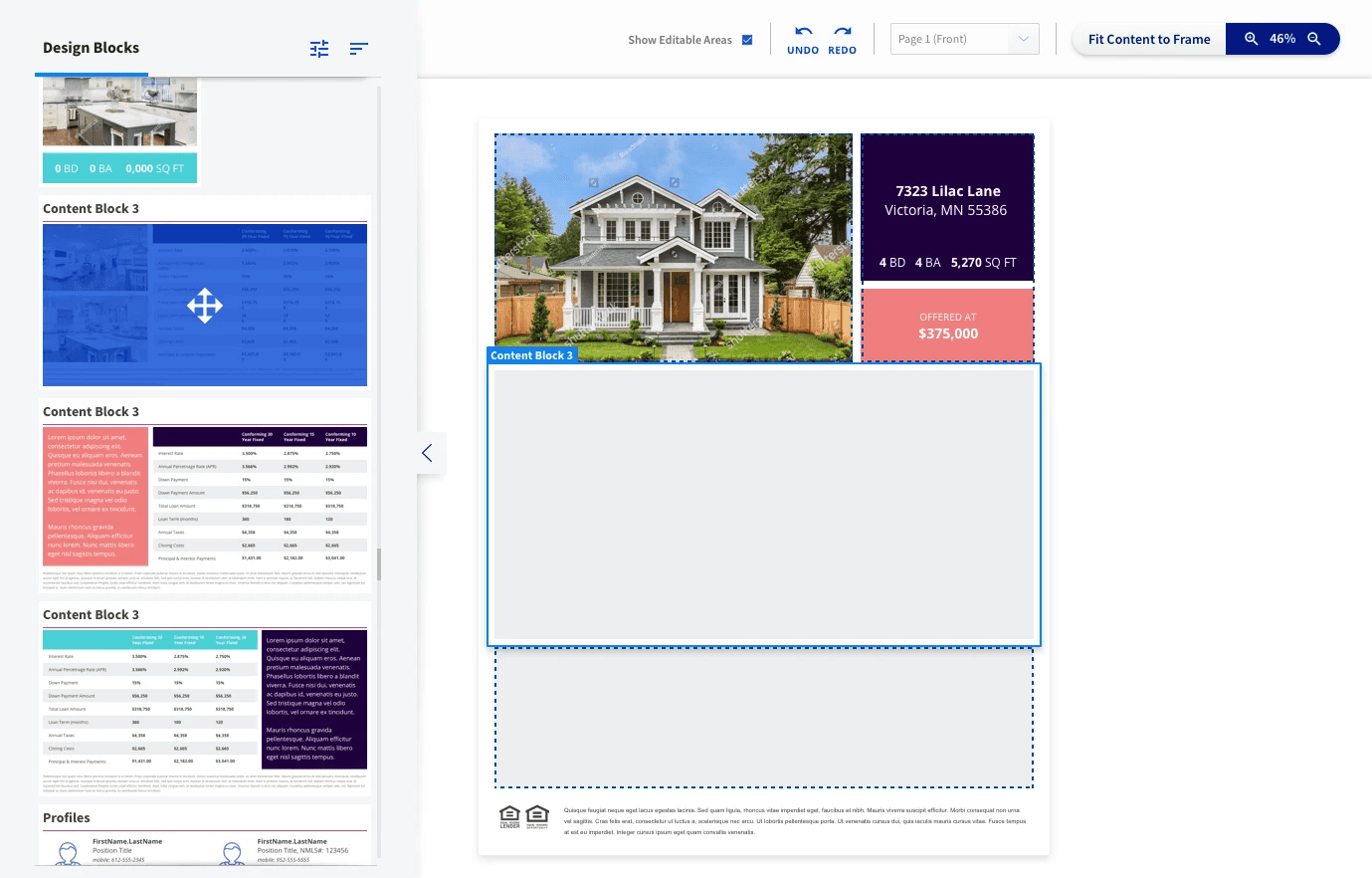
Pre-approved templates could fire immediately; customized content needed approval before sending. This shaped what "send an email" could even mean inside a journey.
Flexibility While Maintaining Compliance
I was working on redesigning and adding additional flexibility to Total Experts Content Creator. We wanted to give our users the flexibility to create their own material using pre-approved content blocks. Functionality we could integrate into the journey builder to allow users to customize content on the fly without long pre-approval waits.
Questions to Answer
Before any UI, I mapped the underlying system.
What actions existed?
What actions did users want automated?
How did each action need to be configured?
What can be automated while maintaining compliance?
What product questions were still open?

More in-depth task workflow helped us to find open questions

Basic Outline for Each Action Type
Mapping what “automation” actually meant
Working with the PM, I mapped the eight core action types Marketing Admins were requesting.
Core Action Types
Create & Assign a Task
Add to Auto-Campaign
Send an Email
Send an SMS
Add to a Group
Share a Contact
Assign a Contact
Send a Closing Gift
I mapped the full task flow for one specific automation: a Marketing Admin assigning a recurring task to a Loan Officer. This flow exposed every decision point the system needed to handle — single vs. multiple assignees, due dates, recurrence patterns, save states, what happens if the LO doesn't open the email, what counts as completion, and how a recurring journey loops or ends.

Ideation
Thinking it through
with the team
UX was new; developers were used to making the calls; the ~6 working sessions were where we built shared understanding and caught feasibility issues early. "It was one of the first times design and engineering really worked as partners at Total Expert."


Final Designs
Take a walk through the Journey Builder
I created a guided modal walkthrough for first-timers, drag-and-drop canvas for power users while maintaining a single-visual form throughout.
New-user onboarding prototype
Final Designs
What I’d do differently
Push harder for research access
I treated the lack of user research as a constraint to work around. Looking back, I would have advocated harder. Even a handful of unstructured conversations with three or four Marketing Admins would have validated the action vocabulary, surfaced edge cases I missed, and given me concrete user voices to bring into design reviews.
Test the modal vs. canvas split with real users
I designed two parallel paths because I believed Marketing Admins span a skill range. I never validated that belief. It's possible that everyone preferred one mode and the other was wasted effort. It's also possible that users moved between modes depending on the journey, a modal for unfamiliar work and the canvas for familiar patterns. Either answer would have shaped the priority of the two designs.
Resolve the recurring-task overlap question
One of the open questions in the task flow sidebar was: what happens if a recurring task's previous instance hasn't completed before the next one fires? I flagged it but the issue was never resolved. I would have liked to work with development on this issue further to get a better understanding of the kind of issues is type of conundrum could cause for the system and whether it was a bug that needed to be fixed immediately.
